Variable products in WooCommerce are essential when you want to offer product options such as size, colour, pattern, or any other attribute.
For example, a T-shirt may come in multiple colors and sizes. Each color–size combination becomes a unique product variation, allowing WooCommerce to manage stock, pricing, and even variation-specific images. When a customer selects a variation, WooCommerce dynamically updates the product image to match.
Using variation specific data can be incredibly valuable for SEO. Using the variation name or variation terms as image attributes can help search engines better understand what your images represent—especially in large catalogs where product images look similar but differ by color or size.
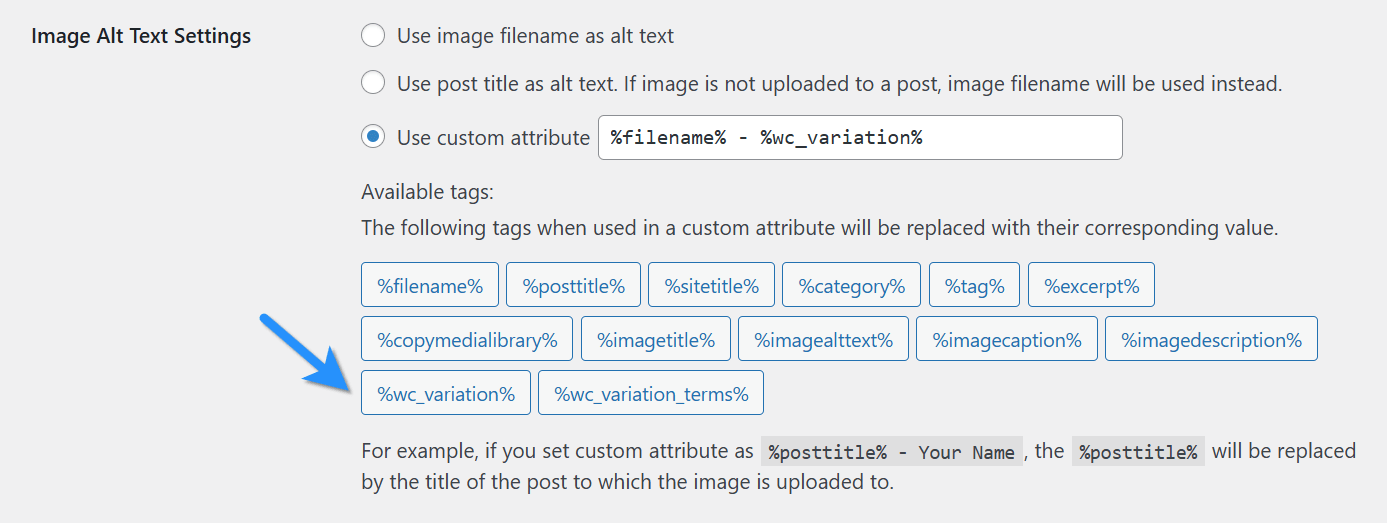
To enable this, Image Attributes Pro version 4.8 and beyond supports two new custom image attribute tags.
1. %wc_variation% – Full Variation Name
Use this tag when you want both the attribute and term in your image attributes.
Example: Color: Red, Size: Large.
2. %wc_variation_terms% – Variation Terms only
To use only the WooCommerce product variation terms in image attributes. Terms are separated by commas.
Example: Red, Large.
When WooCommerce is activated, these tags will be available in Image Attributes Pro settings. You can use them in alt text, title, caption, or description fields under Advanced Settings.
Using Variation data with the Product Title
The product title of a WooCommerce product can be used using the custom image attribute tag %posttitle%.
WooCommerce automatically appends variation terms to the product title. For example, the %posttitle% for the tee shirt in our example would be: Tee Shirt - Red, Large.
This eliminates the need for further use of variation specific attribute tags. However, it doesn’t offer much flexibility. You may want to just use the product title of the parent product without any variation data.
The best solution is to define a custom attribute tag that will always fetch the product title and not the variation data. In Image Attributes Pro you can easily create your own custom image attribute tags.
Let’s call our new custom attribute tag as %wc_posttitle%. Now add this code to the functions.php of your active theme or any snippets plugin and you are good to go.
%wc_posttitle% will behave just like %posttitle% except for WooCommerce product variations. For product variations, it will be the title of the product without the variation info.
This gives you full control to create highly descriptive and SEO-friendly alt text patterns such as:
%wc_posttitle% - %wc_variation_terms%. Example:Tee Shirt – Red, Large.- Buy
%wc_variation% %wc_posttitle%Online | Brand Name
Need Help or Have Questions?
If you’d like guidance on setting up custom attribute tags or optimizing your SEO strategy with Image Attributes Pro, feel free to reach out.